.png)
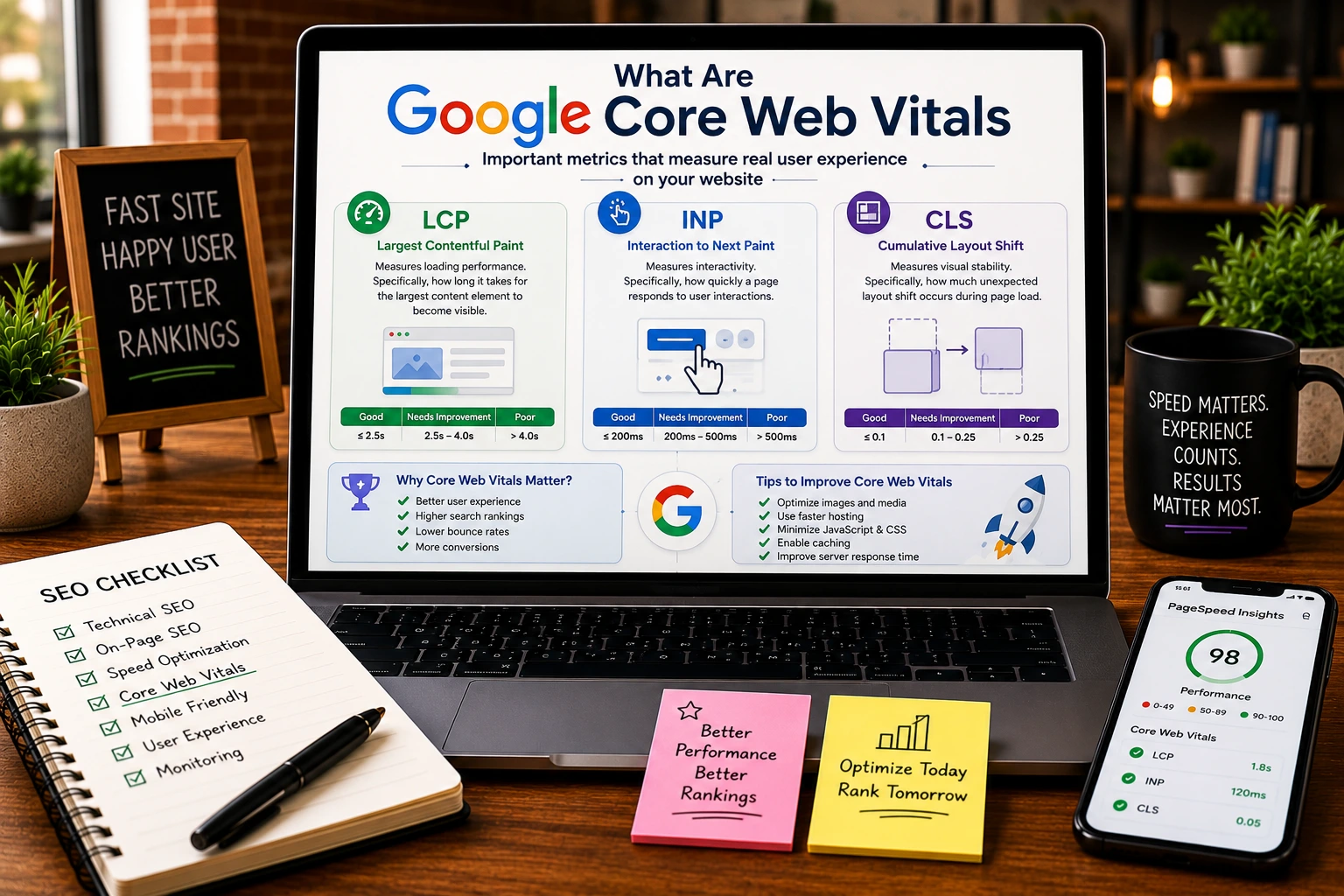
Website speed and user experience have become critical ranking factors in modern SEO. Google wants to provide users with fast, stable, and responsive websites that deliver a positive browsing experience.
To help website owners measure user experience, Google introduced Core Web Vitals, a set of performance metrics that evaluate how real users interact with webpages.
Understanding core web vitals for SEO is essential for businesses that want to improve rankings, increase engagement, and provide a better experience for visitors.
If you’re learning the fundamentals of search optimization, our complete guide on SEO provides a broader overview of how technical and content-related ranking factors work together.
What Are Core Web Vitals?
Core Web Vitals are a group of user experience metrics developed by Google to measure how quickly and smoothly a webpage performs for visitors.
These metrics focus on three key areas:
- Loading speed
- Interactivity
- Visual stability
Rather than evaluating technical performance alone, Core Web Vitals measure how users actually experience a webpage.
Google uses these signals as part of its broader page experience evaluation process.
Why Core Web Vitals Matter for SEO
Google’s goal is simple: reward websites that provide better user experiences.
Poor website performance often leads to:
- Higher bounce rates
- Lower engagement
- Reduced conversions
- Frustrated visitors
Strong core web vitals for SEO help businesses:
- Improve user satisfaction
- Increase page engagement
- Support organic rankings
- Enhance mobile experiences
- Reduce abandonment rates
Although Core Web Vitals are not the only ranking factor, they contribute to overall website quality and search visibility.
The Three Core Web Vitals Metrics
1. Largest Contentful Paint (LCP)
Largest Contentful Paint measures how quickly the main content of a page loads.
Examples include:
- Hero images
- Large text blocks
- Featured banners
- Primary content sections
Good LCP Score
| Score | Performance |
| Under 2.5 Seconds | Good |
| 2.5 – 4 Seconds | Needs Improvement |
| Over 4 Seconds | Poor |
Common Causes of Poor LCP
- Large images
- Slow servers
- Excessive JavaScript
- Unoptimized code
The faster your primary content appears, the better the user experience.
2. Interaction to Next Paint (INP)
Interaction to Next Paint measures how responsive a webpage feels when users interact with it.
Examples include:
- Clicking buttons
- Opening menus
- Submitting forms
- Navigating pages
Google replaced First Input Delay (FID) with INP because it provides a more complete measurement of page responsiveness.
Good INP Score
| Score | Performance |
| Under 200ms | Good |
| 200–500ms | Needs Improvement |
| Over 500ms | Poor |
Common Causes of Poor INP
- Heavy JavaScript execution
- Excessive third-party scripts
- Complex page interactions
Fast responsiveness improves user satisfaction and engagement.
3. Cumulative Layout Shift (CLS)
Cumulative Layout Shift measures visual stability.
It evaluates whether elements unexpectedly move while a page loads.
Examples of Layout Shifts
- Images loading without dimensions
- Advertisements pushing content
- Buttons moving while loading
- Dynamic content insertion
Good CLS Score
| Score | Performance |
| Under 0.1 | Good |
| 0.1–0.25 | Needs Improvement |
| Over 0.25 | Poor |
Visitors become frustrated when content shifts unexpectedly while they are trying to interact with a page.
Core Web Vitals Score Explained
Many website owners ask about their Core Web Vitals score.
Google evaluates pages based on all three Core Web Vitals metrics.
To pass Core Web Vitals assessments:
- LCP should be under 2.5 seconds
- INP should be under 200 milliseconds
- CLS should be under 0.1
A page must meet recommended thresholds across all metrics to achieve a strong overall performance rating.
How to Check Your Core Web Vitals Score
Several tools allow website owners to monitor Core Web Vitals.
Popular Tools
Google PageSpeed Insights
Provides:
- Core Web Vitals data
- Performance suggestions
- Mobile and desktop analysis
Google Search Console
Shows:
- Core Web Vitals reports
- Site-wide performance issues
- URL-specific recommendations
Lighthouse
Provides detailed technical diagnostics and optimization suggestions.
GTmetrix
Offers performance testing and loading analysis.
These tools help identify issues affecting your Core Web Vitals score.
Common Core Web Vitals Problems
Many websites struggle with similar performance issues.
Slow Server Response Times
Slow hosting environments often affect loading speed.
Large Image Files
Uncompressed images significantly increase page load times.
Excessive JavaScript
Heavy scripts can delay interactivity.
Layout Shifts
Missing image dimensions and dynamic content frequently cause instability.
Too Many Third-Party Scripts
Advertising tools, chat widgets, and tracking software often reduce performance.
How to Improve Core Web Vitals
Optimize Images
Large image files are one of the most common causes of poor performance.
Best practices include:
- Compression
- Modern image formats
- Lazy loading
- Proper sizing
Improve Hosting Performance
Faster hosting helps reduce server response times and improve loading speed.
Reduce JavaScript Usage
Removing unnecessary code improves responsiveness and page speed.
Enable Browser Caching
Caching allows returning visitors to load pages more quickly.
Use a Content Delivery Network (CDN)
CDNs distribute content across multiple locations, reducing loading delays for users.
Prevent Layout Shifts
To improve CLS:
- Set image dimensions
- Reserve ad space
- Avoid dynamic content shifts
How Core Web Vitals Support Technical SEO
Core Web Vitals are closely connected to technical optimization.
A strong understanding of technical SEO explained concepts can help website owners address the underlying causes of performance problems.
Many Core Web Vitals issues originate from:
- Site architecture
- Code efficiency
- Server performance
- Resource loading
Technical SEO improvements often lead directly to better Core Web Vitals scores.
Core Web Vitals and Local SEO
Website performance also affects local businesses.
Users searching for local services expect fast-loading websites and smooth mobile experiences.
Businesses investing in local SEO for small business strategies should regularly monitor performance metrics because user experience directly impacts conversions and engagement.
How Search Operators Help Technical Audits
Performance analysis often requires reviewing indexed pages, duplicate content, and crawl issues.
SEO professionals frequently use advanced search techniques such as mastering google search operators to uncover technical problems that may affect both indexing and user experience.
Combining technical audits with performance optimization creates a stronger overall SEO strategy.
Core Web Vitals vs Traditional SEO Ranking Factors
Core Web Vitals are important, but they are not the only ranking signal.
Google still evaluates:
- Content quality
- Search intent
- Backlinks
- Authority
- Relevance
- User engagement
Businesses learning what is SEO should understand that Core Web Vitals complement broader SEO efforts rather than replace them.
Why Businesses Should Monitor Core Web Vitals Regularly
Websites change constantly.
New content, plugins, scripts, and design updates can all affect performance.
Regular monitoring helps businesses:
- Detect issues early
- Maintain rankings
- Improve user experience
- Support conversion rates
Many organizations offering SEO services in the USA include Core Web Vitals monitoring as part of ongoing optimization efforts because performance improvements often benefit both SEO and user satisfaction.
How Design Vertices Helps Improve Website Performance
At Design Vertices, technical optimization plays a key role in every SEO strategy.
Our team helps businesses improve:
- Core Web Vitals
- Site speed
- Mobile usability
- Technical SEO
- User experience
- Search visibility
By combining performance optimization with content and technical improvements, businesses can build stronger foundations for long-term organic growth.
Final Thoughts
Understanding core web vitals for SEO is essential for maintaining a fast, responsive, and user-friendly website.
The three Core Web Vitals metrics, Largest Contentful Paint, Interaction to Next Paint, and Cumulative Layout Shift, provide valuable insights into how users experience your website.
While Core Web Vitals are only one part of SEO, improving these metrics can lead to better engagement, stronger user experiences, and improved search visibility in 2026 and beyond.
FAQs
What are Google Core Web Vitals?
Google Core Web Vitals are performance metrics that measure loading speed, responsiveness, and visual stability.
Why are Core Web Vitals important for SEO?
They help improve user experience and contribute to Google’s page experience evaluation.
What is a good Core Web Vitals score?
A good score typically includes an LCP under 2.5 seconds, an INP under 200 milliseconds, and a CLS under 0.1.
How can I check my Core Web Vitals score?
You can use Google PageSpeed Insights, Google Search Console, Lighthouse, or GTmetrix.
Do Core Web Vitals affect rankings?
Yes, Core Web Vitals are considered part of Google’s page experience signals and can influence rankings.
How often should I monitor Core Web Vitals?
Performance should be reviewed regularly, especially after website updates, redesigns, or new feature implementations.
